Work out the transitions.
Pull from the Lagree move library. Reorder the sequence, note left and right, and set springs, timed sets, and your own coaching cues. See the total as you build.
FOR LAGREE INSTRUCTORS
Plan the moves, springs, and cues on your laptop. Take your flow to class on iPhone or Apple Watch. Make it yours again next week.
No card required. Sample opens without an account.
FROM THE FIRST BEAR TO THE FINAL HOLD
Pull from the Lagree move library. Reorder the sequence, note left and right, and set springs, timed sets, and your own coaching cues. See the total as you build.
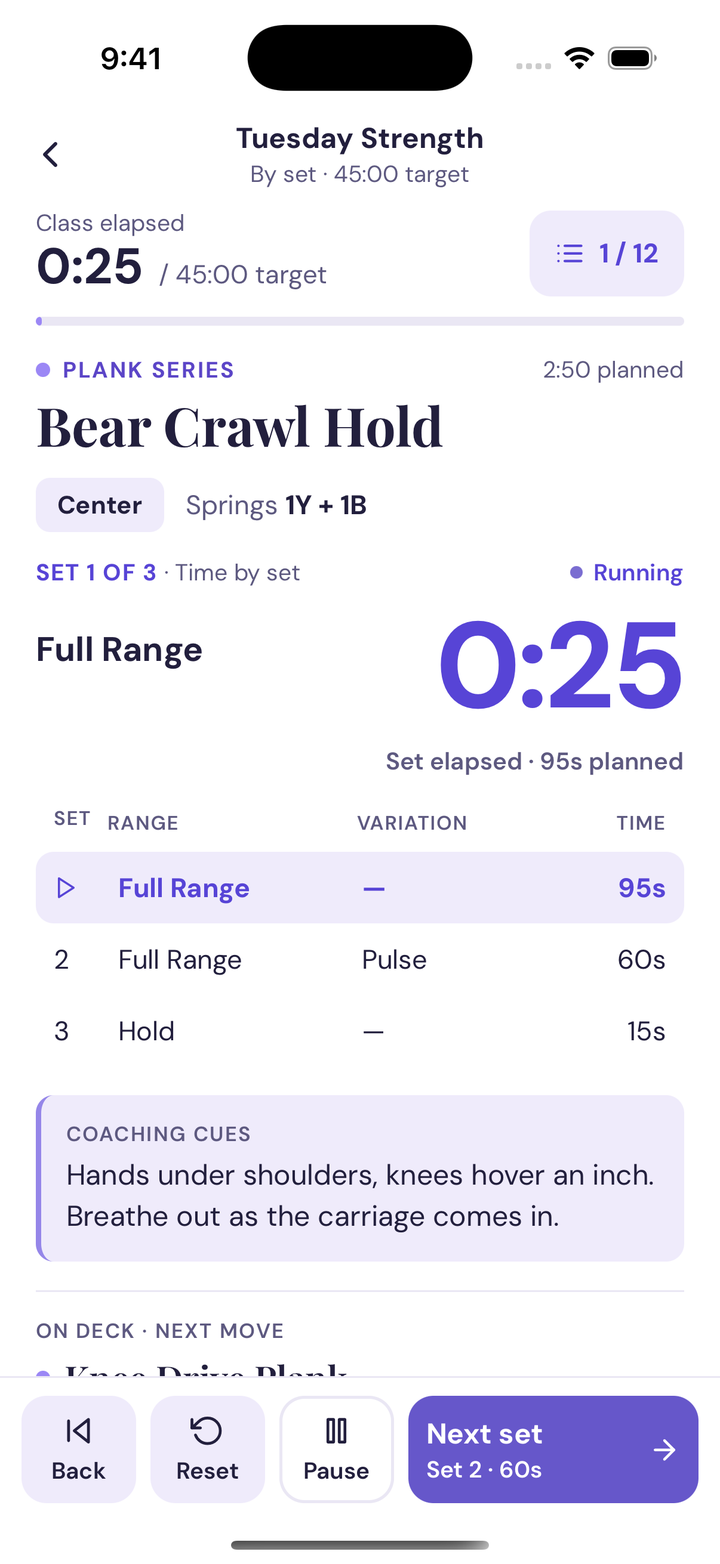
Your phone keeps the current move, its sets, and what’s on deck in view. Advance when you’re ready. Your plan supports your pacing.
Find a past flow, duplicate it, and adjust for the next class. Put it on your schedule so your next teaching day already has a plan.
THE TEACHING WINDOW
You’ve planned the spring change. You know the next side. Bring those details with you, instead of holding the whole class in your head.
Start planning in your browser. Use the same account on iPhone.
NEWLY CERTIFIED OR IN TRAINING
Keep your sequence, spring changes, timing, and cues together, and practice teaching from your plan before a practice class, an audition, or your first shift.
Nothing But Flows is a class-planning and teaching tool. It organizes the plan you build from your own training. It isn’t instructor certification, and it doesn’t choose your programming for you.
A short example with every move’s side, springs, timed sets, and cues on one page. No account needed.
A blank plan to fill in by hand: sequence, sides, springs, sets, timing, cues, and a place to reflect after you practice.
TRY IT WITH YOUR NEXT CLASS
Build a class, teach from it, and come back to make the next one.
Start my 7-day trialYour 7 days of Pro begin when you create your account. No payment card is needed, and the signup trial does not automatically charge you.
After the trial, subscribe to keep creating, editing, scheduling, and teaching. You can still view and share your saved flows.
Subscription options and current prices appear in the app before you choose to pay.
Just looking? Explore the sample →QUESTIONS
A class-planning and teaching tool for Lagree instructors. You build a flow: your moves in order, each with its side, spring load, timed sets, and your own coaching cues. Then you teach from it with a timer that shows the current move and what’s next.
Lagree instructors who plan their own classes, including newly certified instructors and trainees preparing practice classes, auditions, and first teaching shifts. It organizes the plan you bring from your training. It is not instructor certification, and it does not decide your programming for you.
Yes. The sample flow opens without an account. The same sample written out in full and the class-plan worksheet are public pages you can read and print.
A web browser for planning. To teach, use the teaching timer in your browser, or sign in to the same account on iPhone. An Apple Watch can run a flow synced from your iPhone.
Your 7 days of Pro begin when you create your account. No payment card is needed, and the signup trial does not automatically charge you. After the trial, subscribe to keep creating, editing, scheduling, and teaching; you can still view and share your saved flows. Subscription options and current prices appear in the app before you choose to pay.